Tap-anywhere counting
The full screen is the target. A ripple follows your thumb so you know it landed, and a hard 130 ms guard means a double-tap never counts twice.
 Chant
Chant
A counter, and little else
Chant is a mala counter for iPhone and iPad that stays out of the way. Tap anywhere on the screen to count. Keep a few chants ready, each with its own colour and round length. Nothing leaves your device.
Tap anywhere
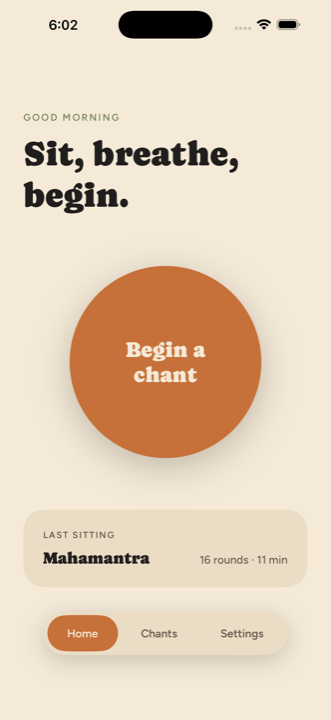
No button to hunt for, no way to lose your place. Every tap turns one bead, with a soft pulse under your thumb. At the end of a round a small bell rings and the mala turns over.
Try it — tap the panel
On the Lock Screen
A sitting raises a Live Activity: the chant, the count, the beads and a clock that keeps its own time, on the Lock Screen and in the Dynamic Island. Pause it, end it, or turn a bead without unlocking.
A bead pressed here has to wake the app, so it trails your thumb by a moment. That's why Pause and End are the large buttons — counting proper still belongs on the screen.
In the app today
Chant ships with the small set of things a counter actually needs — and stops there.
The full screen is the target. A ripple follows your thumb so you know it landed, and a hard 130 ms guard means a double-tap never counts twice.
Count to 108 the traditional way, or let a round be a stretch of time. Set how many rounds make a sitting and the ring fills either way.
Save the ones you come back to. Each carries a name, a colour, its own numerals, its round length, and artwork if you want it.
A soft two-partial tone — 528 Hz with a quiet overtone above it — synthesised on the spot. One ring when a round turns, two when the sitting ends.
A light pulse on every bead and a firmer one when the mala turns over, so you can sit with your eyes closed and the phone face-down in your lap.
Attach the words to a chant and keep them collapsed while you sit. One tap reveals them if you lose the line, and folds them away again.
Put a small framed image over the ring — a deity, a photograph, a page you like — resting on a soft ground rather than cropped to a square.
Sittings, rounds, repetitions and time — plus which chants took the hours. It reports, it doesn't nag, and it never turns a missed day into a broken streak.
No account to make, no server to trust, nothing to sign in to. Your history lives in the app's own storage and goes nowhere else.
A square card with the rounds and the chant's colour — saved straight to Photos or handed to Messages, Notes or anywhere else. No numbers you didn't choose to show.
A Live Activity carries the count, the beads and a self-running clock onto the Lock Screen and the Dynamic Island — with Pause and End a thumb away, no unlock needed.
Leave the app, take a call, or let iOS close it entirely — the sitting is written down as you go and is waiting, paused, when you come back.
Light, dark or automatic. Six accents. Three faces for the numerals. Your own name and greeting on the home screen — or neither, if you'd rather.
Five screens, end to end
Built for every size Apple ships — from an iPhone SE up through a 13” iPad Pro, portrait or landscape. Every measurement is a share of the app's own content area, so nothing is just a stretched phone layout.
01 — Home
A greeting that follows the hour, one large button, and the sitting you did last. That's the whole screen.
02 — Before you begin
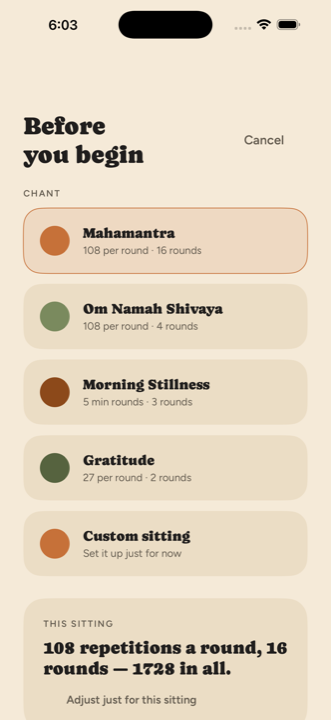
Pick a saved chant and start, or nudge the rounds and repetitions for this sitting alone — without editing the template you'll use tomorrow.
03 — The sitting
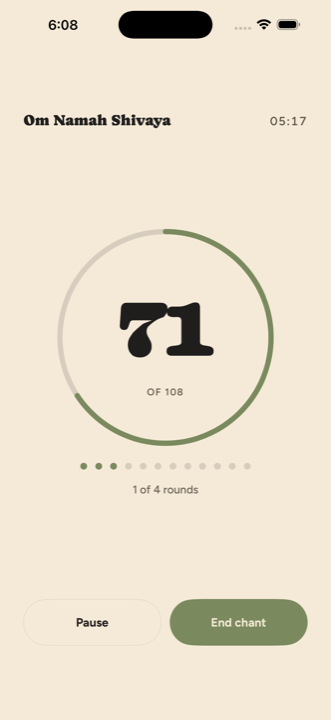
Elapsed time in the corner, the ring filling to the round, a bead for each round you've finished. Pause and resume whenever you like.
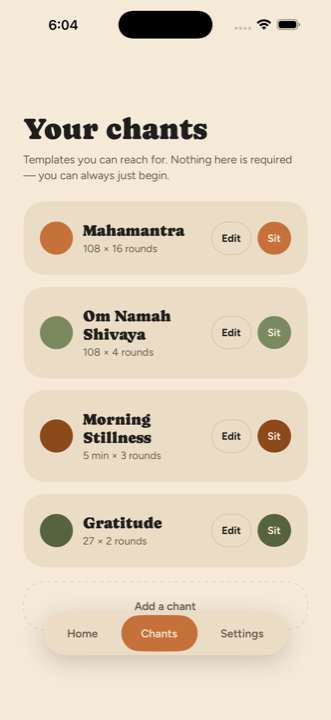
04 — Your chants
Nothing here is required — you can always just begin. But when a chant becomes a habit, save it with its colour, its numerals and its length.
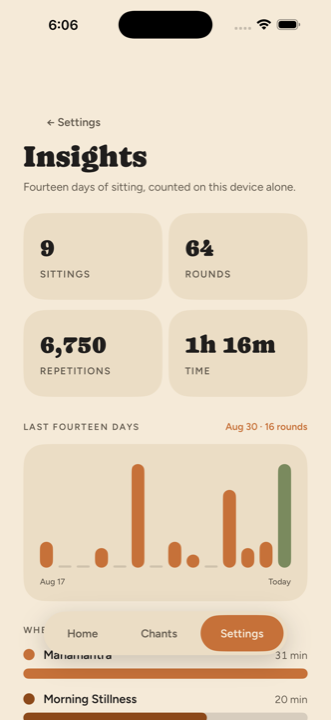
05 — Insights
Tap a bar to read the day. See where the hours went by chant, and the last five sittings — the numbers are yours, and they stay put.
Insights
Chant keeps a plain record of what you actually did. No goals you didn't set, no badges, no push notification when you miss a Tuesday.
You sat on 9 of the last fourteen days. Your longest single sitting was 31 minutes.
Make it yours
Change them here and the whole page follows — it's the same palette the app uses.
Terracotta — used everywhere a chant has no colour of its own.
Auto follows your phone from sunrise to sunset.
The face the count is drawn in, per chant.
Privacy
There is no account, because there is no server. Chant writes your chants and your history into its own storage on the device and reads them back. That's the whole data model.
What's next
Chant is a one-person project, so the list is short on purpose. Anything that would need an account or a server doesn't make it on.
Your last sitting and a one-tap way into the chant you sit with most, without opening the app first. The Live Activity landed first; this is the other half.
Count from the wrist with the Digital Crown or a tap, with the same haptic on every bead. The phone can stay in your pocket.
“Begin my morning chant” as a Siri phrase, an automation that starts a sitting when a Focus turns on, and a Shortcuts action for the rest.
The layout already scales from a share of its own content area — this finishes the job for split view and a resized window.
Off by default, and only ever your own private iCloud database — so an iPhone and an iPad can share a history without anyone else holding it.
A small starting set of common chants with transliteration, so a new chant doesn't have to begin with typing.
An optional soft tick to chant along with, for the sittings where the pace is the hard part.
Your sittings as a plain CSV file you keep. It's your record; you should be able to walk away with it.
One local notification at an hour you choose, that never mentions a streak and never guilts you for yesterday.
Missing something?
One question, no account.
Questions
No. There isn't one to make. Open the app and start counting — the first thing you see is a greeting and a button.
It's on the App Store, free, for iPhone and iPad running iOS 17 or later. There is nothing to sign up for and nothing to buy inside it — no subscription, no ads, nothing held back behind a purchase.
In the app's own storage, on your device. It is never uploaded, and there is no server holding a copy. That also means deleting the app deletes the record — export is on the list above for exactly this reason.
It's the traditional length of a mala, so it's the default. It isn't a rule — set a round to 27, to 1,008, or to a number of minutes instead.
The sitting is written down whenever the app leaves the foreground, so a call, a switch to another app, or iOS closing it outright doesn't lose your place. It comes back paused, exactly where you left it.
Yes. A sitting puts a Live Activity on the Lock Screen and in the Dynamic Island, with buttons to pause, to end, and to turn a bead — none of which need you to unlock the phone. The elapsed clock runs there on its own. Counting a full mala this way works, but each press has to wake the app, so it lags a little; for eyes-closed counting the screen itself is still the better bead.
It will tell you if you've sat several days running, because that's a pleasant thing to notice. It will never turn a gap into a failure, and it will never send you a notification about one.
Yes — one universal app for iPhone and iPad, iOS 17 and up. Sizes are expressed as a share of the app's own content area rather than the device screen, so the layout is genuinely rebuilt at each size instead of centred inside a phone-shaped box.
That's the intent. A light haptic marks each bead, a firmer one marks the round, and the bell tells you the mala turned. Keep the screen awake in Settings and the phone can sit face-down in your lap the whole time.
Chant for iPhone & iPad
Built by one person who wanted a counter that felt calm. No accounts, no cloud, no streaks to break.
It's on the App Store now, free. If something feels wrong, send a note — that is still the fastest way it gets fixed.
Free. Requires iOS 17 or later. Universal — iPhone and iPad, from an iPhone SE up through a 13-inch iPad Pro.